
How to connect a Roku TV to Wi-Fi without the remote
No remote in hand? Tell the tool your situation and it gives you one method that works — not a list of ten to guess through.
Lost the remote? Find the one method that works
Answer 2–4 quick questions — get a single instruction, not ten.
What do you need to do right now?
Built for Roku-powered TVs (Hisense, TCL, Onn and other Roku TVs). Every step comes from our own tested guides — more TV platforms are being added.
The obvious advice — “just use the app” — is exactly what fails here
Almost every “connect Roku without a remote” answer online tells you to install the Roku app. But a phone remote talks to the TV over your local Wi-Fi — so the TV has to already be on that network for the app to find it. If you're trying to do the first Wi-Fi setup, there's no network to talk over yet, and the app is a dead end. That single catch is why a flat checklist sends most people in circles.
The right method depends on what you actually have: an Ethernet port, a spare USB mouse, a joystick on the TV body, or a second phone to clone your old network. The router picks between them from your answers so you never work through options that can't apply to your TV. The same goes for “syncing” a remote — the fix is completely different for a simple infrared remote (which never pairs) versus an enhanced voice remote (which does), and guessing wrong wastes the most time.
Connect to Wi-Fi
Cable, mouse, joystick or hotspot
Turn it on
Button, HDMI-CEC or Wake-on-LAN
Get a remote working
Sync, fix or replace
Your phone becomes the remote — for good
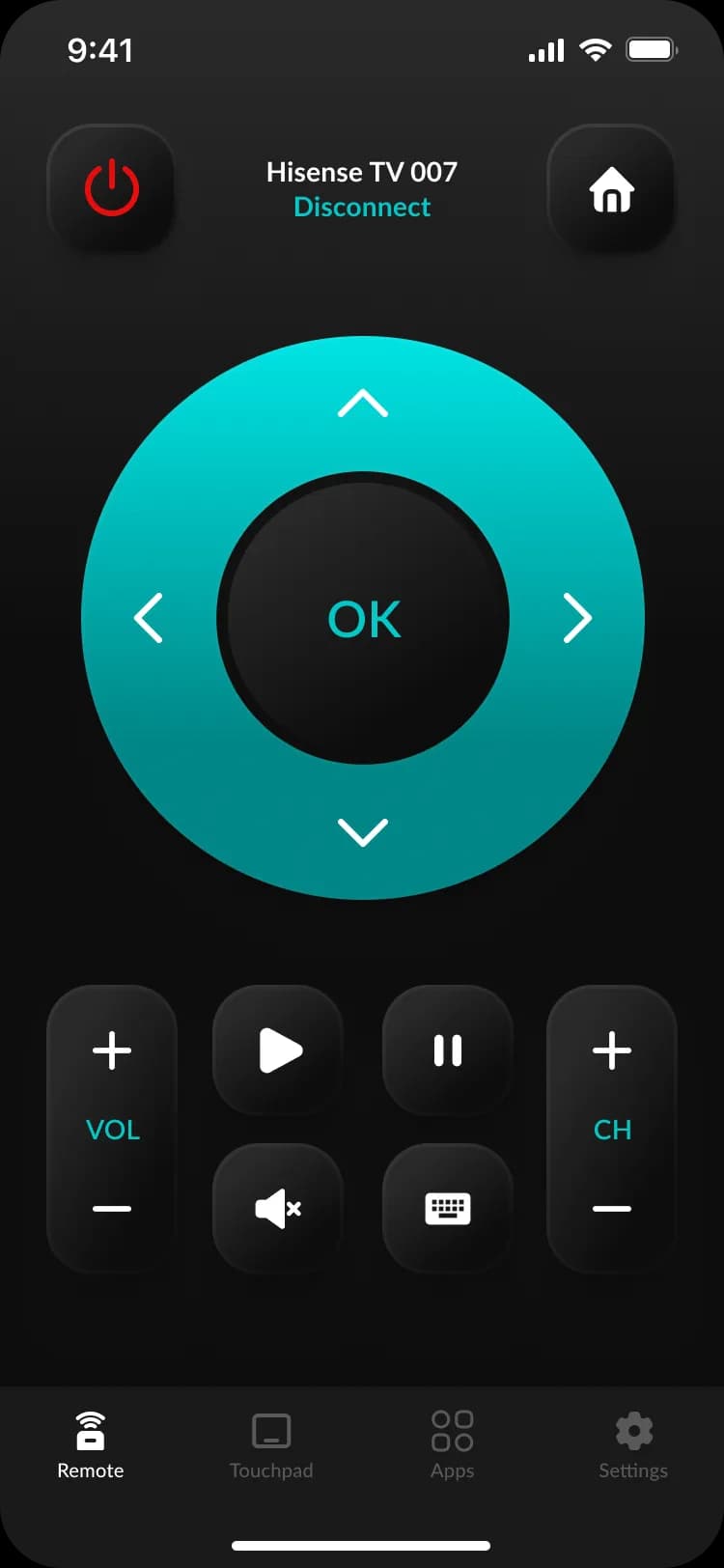
The moment the router gets your Roku TV back on Wi-Fi, the free HiRemote app discovers it on the network with no pairing and no code. This is what it looks like in your hand: a full D-pad, power and volume, app tiles, and a QWERTY keyboard so signing into Netflix or Disney+ doesn't mean pecking letters with a directional pad.
Prefer nothing to install? The Roku remote online does the same job from any web page once the TV is online.
The full written guides behind each method
Connect to Wi-Fi without the remote
Ethernet, USB mouse, joystick and hotspot, step by step
Roku remote without a pairing button
Simple IR vs enhanced, and how each one connects
Lost your Roku remote?
Five fixes, free, ranked by speed
Free Roku remote online
Control a Roku TV that's already online — no install
Questions about controlling a Roku TV with no remote
Can you really connect a Roku TV to Wi-Fi without the remote?+
Yes, in several ways — but which one works depends on your exact situation, which is why this page is a tool and not a single set of steps. If the TV has an Ethernet port you can skip Wi-Fi entirely; if it has a joystick button or you have a USB mouse you can drive the menus; if you swapped routers you can clone the old network with a phone hotspot so the TV reconnects on its own. The router above asks two to four questions and points you at the one method that fits.
Why won't the Roku app (or any phone remote) connect to my TV?+
Because a phone remote controls the TV over your local Wi-Fi — so the TV has to already be on that same network for the app to find it. That's the catch behind almost every 'without a remote' problem: the app can't do the very first Wi-Fi setup, because there's no network to talk over yet. You have to get the TV online another way first (cable, USB mouse, joystick, or the hotspot trick), and then the app takes over.
How do I sync a Roku remote without a pairing button?+
It depends which of the two Roku remote types you have. A simple infrared (IR) remote has no pairing button because it never pairs — it just needs fresh batteries and a clear line of sight to the TV. An enhanced (voice) remote does pair, but the pairing button is only a shortcut: a power-cycle or the Settings menu pairs it without the button. Pick 'Get a remote working' in the tool and it walks you to the right one.
How do I turn on a Roku TV with no remote at all?+
If the TV has a physical button — on a Hisense Roku TV it's usually a small joystick on the back-right — a single press powers it on. If the bezel is clean with no button, a device plugged into HDMI can wake it over HDMI-CEC, or a phone remote can if the TV was already set up on Wi-Fi with Fast TV Start left on. The 'Turn it on' path in the tool covers each case.
Is this tool free, and does it send anything to a server?+
It's completely free and runs entirely in your browser — there's no login, no download, and nothing about your TV or your network ever leaves the page. The router is just a decision tree built into the web page itself. The only optional install is our free iPhone app, which becomes your permanent remote once the TV is back online.